Why X1-SPT series need the load EPS overload reset?
Because X1-SPT series inverter without LED control screen, when EPS overload occurs, SPT inverter will stop output. What need to do is to turn off some low level EPS loads which make the EPS loads less than the EPS rated power. At the same time please clear the EPS overload alarm and reset the system.
But the local way currently need the APP in smart phone. For some end user who are not good at using the smart phone or there is no WiFi for remote reset, it’s not a friendly way, as a result, Solax developed an external local reset solution.
Solax X1-SPT series local EPS overload local solution
Principle: When EPS overload occurs, a reset signal can be sent to the RS485 port of the SPT inverter from a switch manually, so that the inverter can be reset.
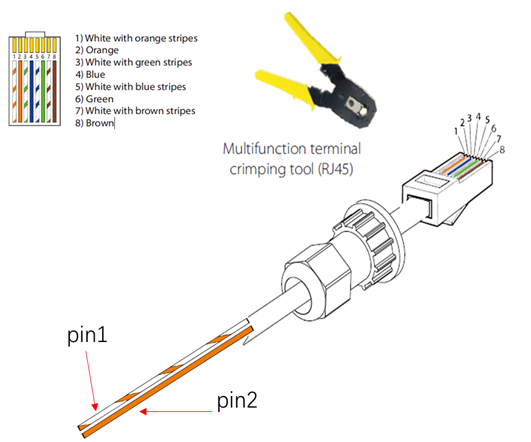
It is a dry contact input signal from pin 1 and pin 2 when they are connected together. The COM pin definition as follow.
Insert the prepared communication cables into the RJ45 terminals in sequence, and then use network cable crimping pliers to press them tightly.
Take the white with orange stripes pin 1 and the orange pin 2 out separately in another side of the communication cables.
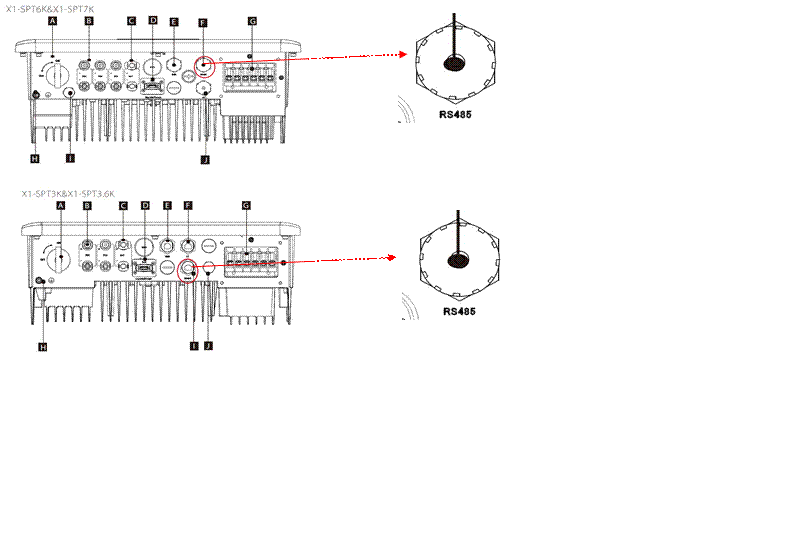
Insert the communication cable RJ45 terminal to the STP inverter RS485 port. For 3k / 3.6k and 6k / 7k their RS485 ports are different, please check the follow figures.
When EPS overload alarm occurs, turn on the switch for 5s then off it, the overload alarm will be clear and the system will be reset.
Note: This feature requires the firmware upgrade to ARM 1.06, DSP 1.07 or above.


 Chuck Lee