Sign in
Already have SolaX Cloud Installer Account
Or
Access to E-Learning
Contact Us
Contact Us
Please visit our official website, select your identity (Installer / Distributor / Homeowner), and follow the instructions to complete registration.
Website: https://www.solaxpower.com/partnerwithus.html
Home / Support / Solution / Details
Project design

    WLV Function for Austria Market

                                             WLV Function for Austria Market             
    Introduction
    WLV is a mandatory remote active power limitation function required by the Austrian grid operator. When the grid operator needs to perform maintenance, protect grid stability, or respond to emergencies, it uses a dry contact to control the inverter and reduce its active power output to zero. 
    Supported Inverter Models and Software Versions
    ModelsFW Versions on SolaxCloudProgressX3 Hybrid G4ARM ≥ V1.56;  DSP ≥ V1.58FW On SolaxCloudX3-ULTRAARM ≥ V25.02; DSP ≥ V25.04FW On SolaxCloudX3-Hybrid-G4-PROARM ≥ V18.04; DSP ≥ V18.04FW On SolaxCloudX3-IESARM ≥ V15.04; DSP ≥ V22.01FW On SolaxCloud    
    Manual 
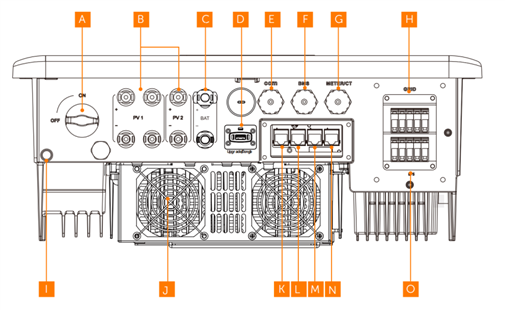
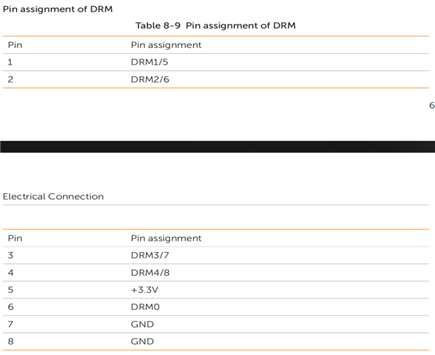
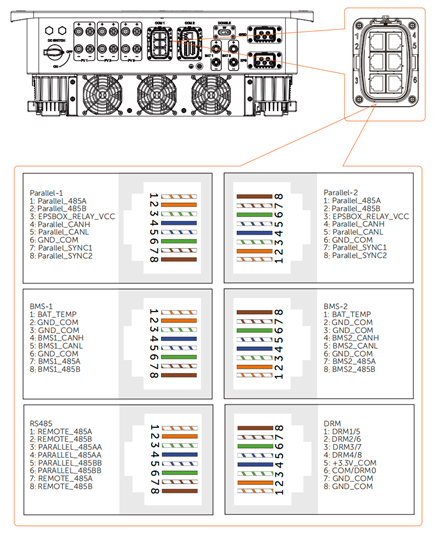
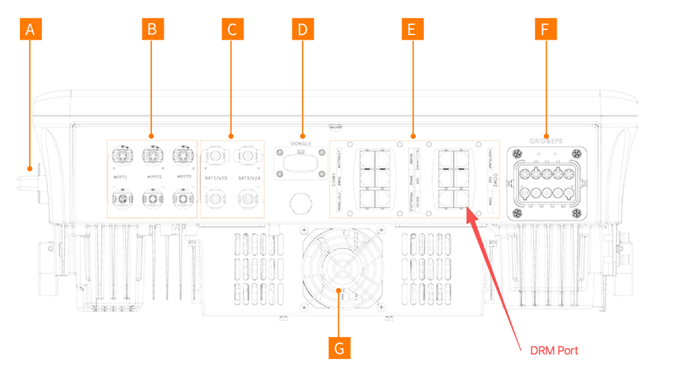
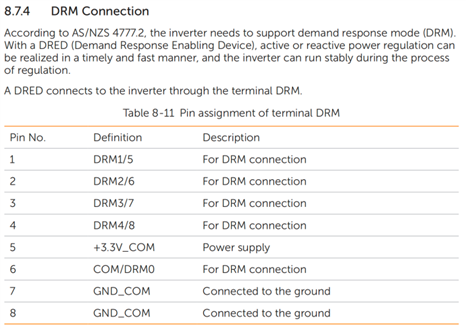
    l  X3 Hybrid G4 1.       Upgrade the FW which should be at least ARM 1.56, DSP 1.582.       Safety Code: TOR3.       Use the PIN 6&7(DRM0) and connect to inverter’s DRM port4.       Enable WLV function: Remote Setting--Advanced--WLV FUN--Enable    
    l  X3-ULTRA 
    1.       Upgrade the FW which should be at least ARM 25.02 , DSP 25.042.       
    Safety Code: TOR3.       
    Use the PIN 6&7(DRM0) and connect to inverter’s DRM port4.       Enable WLV function: Remote Setting--Advanced--WLV FUN--Enable
    l  X3-Hybrid-G4 PRO 
    1.   Upgrade the FW which should be at least ARM 18.04, DSP 18.042.   
    Safety Code: TOR
    3.  
    Use the PIN 6&7(DRM0) and connect to inverter’s DRM port
    a29adb82ba24a9e83ebbcd7d1cd1e8984.   Enable WLV function: Remote Setting--Advanced--OnGrid Settings--WLV FUN--Enable           
     l  X3-IES1.   Upgrade the FW which should be at least ARM 15.04, DSP 22.012.   
    Safety Code: TOR
    3.   
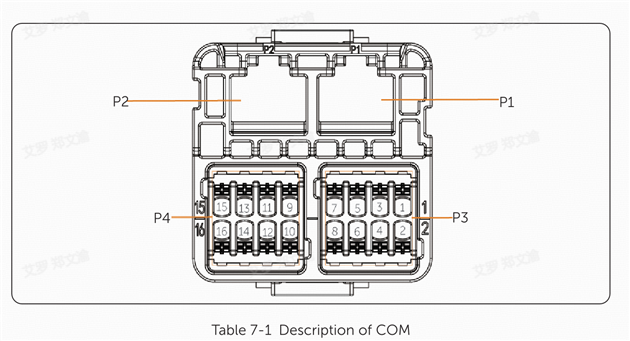
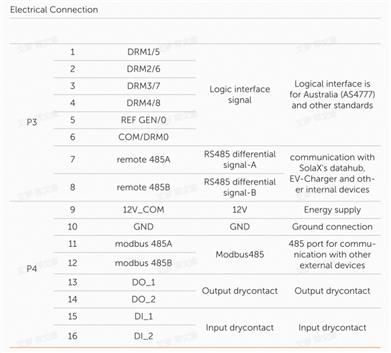
    Use the PIN 6&10(DRM0) and connect to inverter’s COM port
     4.   Enable WLV function: Remote Setting--Advanced--WLV FUN--Enable     
     
    Solax Power's training program aims to empower energy-industry practitioners by enhancing their professional competence through comprehensive learning and certification programs. The program includes both online e-learning courses and hands-on training at classroom. The online component allows participants to learn about product highlights, installation precautions, troubleshooting techniques, and other relevant knowledge through virtual courses. Additionally, participants have the opportunity to book hands-on training sessions where they can practice installation, commissioning, and troubleshooting while engaging in discussions with technical experts from the company.

    About Cookies

    We use cookies to enhance your browsing experience, serve personalized ads or content, and analyze our traffic. By clicking "Accept All", you consent to our use of cookies.
    Accept Reject