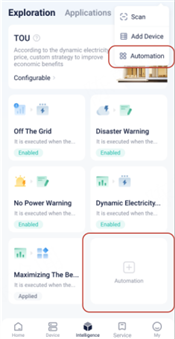
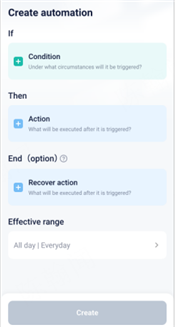
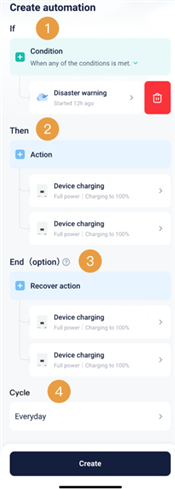
In short, Automation allows users to set an 'IF' condition and a 'Then' action. When the IF condition is met, the system will automatically execute the Then action.
Through the established fixed process, the SolaX Cloud platform helps users to link all kinds of information with simple logic language, and then automatically executed, so that everyone can become a programmer without programming.
This function can be realized simply by connecting the SolaX device to the SolaX Cloud via a communication module (such as a WiFi Dongle). No additional control devices such as a Datahub or EMS are required.
* The End user account in App is currently supported, while Web access is still under development. Installer App support will be added in future versions.
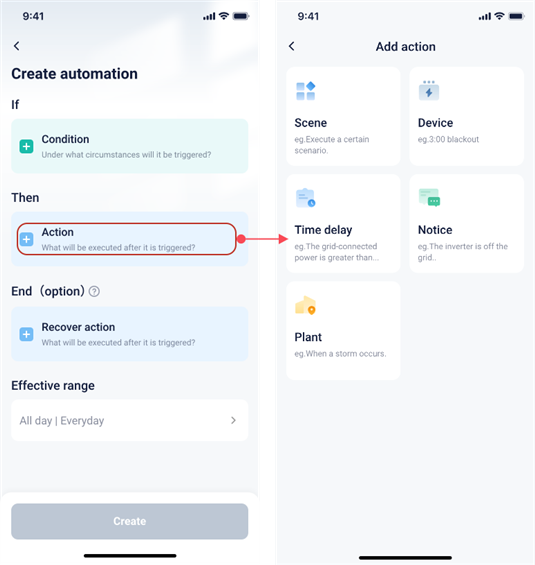
The platform guides users through five simple fixed steps to easily complete the creation of automated scenes.
1. Select the trigger conditions
2. Select the action to be performed after the trigger
3. Select whether you need to perform the recovery action after the scene ends
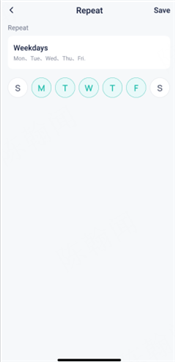
4. Select the way to loop
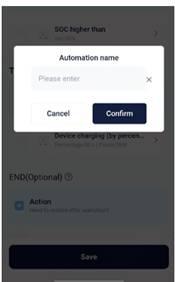
5. Name the automation scene
*Automation scenarios can be viewed in the logs regardless of success or failure, and the logs can be viewed for the last 3 months.
Manually configured by the user through condition and action selection.
|
Automation Scene Creation Process |
||
|
Step |
Description |
Screen |
|
1 |
Entry |
|
|
2 |
Create automation |
|
|
3 |
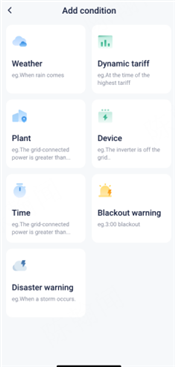
Add condition |
|
|
4 |
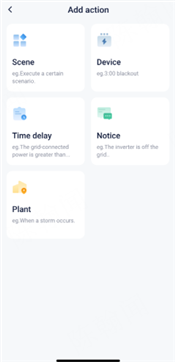
Add action |
|
|
5 |
Add end action (optional) |
|
|
6 |
Add repeat method |
|
|
7 |
Name automation |
|
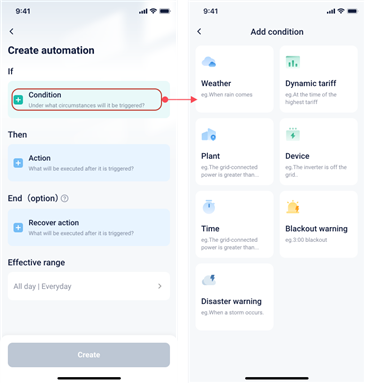
The conditions are divided into 7 categories. The necessary requirements for setting the path and enabling each function are as follows.
|
Category |
Pre-conditions required |
Notes |
|
Disaster Warning |
1.Location 2.Support the power limitation notice from the third party interface 3.Energy storage station 4.If the power station is in Japan, regional information is required. |
Option to select how long before a disaster occurs to set as the trigger condition.
*Currently only supported in the United States and Japan *The system will only work if all the conditions are fulfilled. |
|
Blackout Warning |
1.Location, support the power limitation notice from the third party interface |
Option to select how long before a power outage occurs as a trigger condition
*Currently only supported in South Africa |
|
Weather |
1.Location, support wind weather notice from the third party interface |
Option to select weather conditions or outdoor temperature thresholds as trigger conditions. *Still under development |
|
Dynamic Tariff |
1.Tariff information |
Option to set conditions when the current electricity tariff is higher or lower than a fixed purchase or feed-in price. |
|
Device |
1.Corresponding devices have been added to the site |
Option to select inverter state, battery SOC, low temperature status, and other conditions as trigger conditions.
*Currently only compatible with some hybrid/string inverters, EVC. Other kinds of devices are planned to be in the future. |
|
Time |
1.Location, support wind weather notice from the third party interface |
Option to set sunrise or sunset as trigger conditions through the Reservation Time.
*Still under development |
|
Plant |
1.Restrictions based on different power plant types |
Option to select plant status, feed-in power, purchased power, and other conditions as trigger conditions.
*Still under development |
The actions are divided into 7 categories. The necessary requirements for setting the path and enabling each function are as follows.
|
Category |
Pre-conditions required |
Notes |
|
Devices |
1.Devices already been added |
Able to control the power of the device, such as zero injection or export control
Able to control the device to charge and discharge at certain power.
Able to switch work modes of the device. |
|
Scenes |
1.Scenes already created |
Able to create a scene within another scene, and execute a scene when the conditions are met. *Still in development |
|
Prompt |
None |
Able to notify users via app or email push notifications when conditions are met.
The content of the notifications can be customized and edited. *Still in development |
|
Time Delay |
None |
Able to choose how long to delay the execution of an action when the conditions are met. *Still in development |
|
Plant |
1. There are limitations depending on the specific action. For example, a hybrid inverter is required for charging or discharging. |
Supports selecting grid connection ports at the plant level to enable export control.
Supports selecting grid connection ports at the plant level to control charging and discharging at specified power levels. *Still in development |
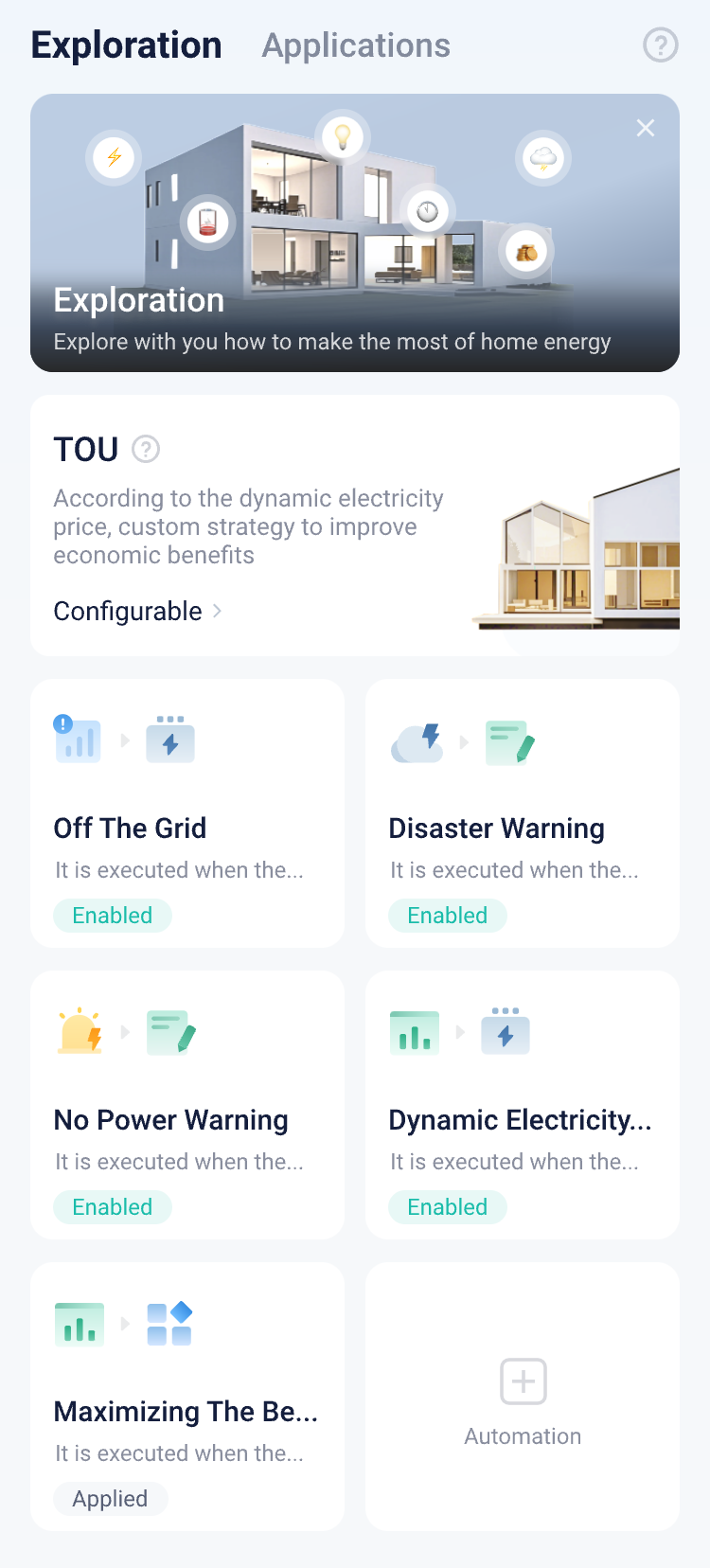
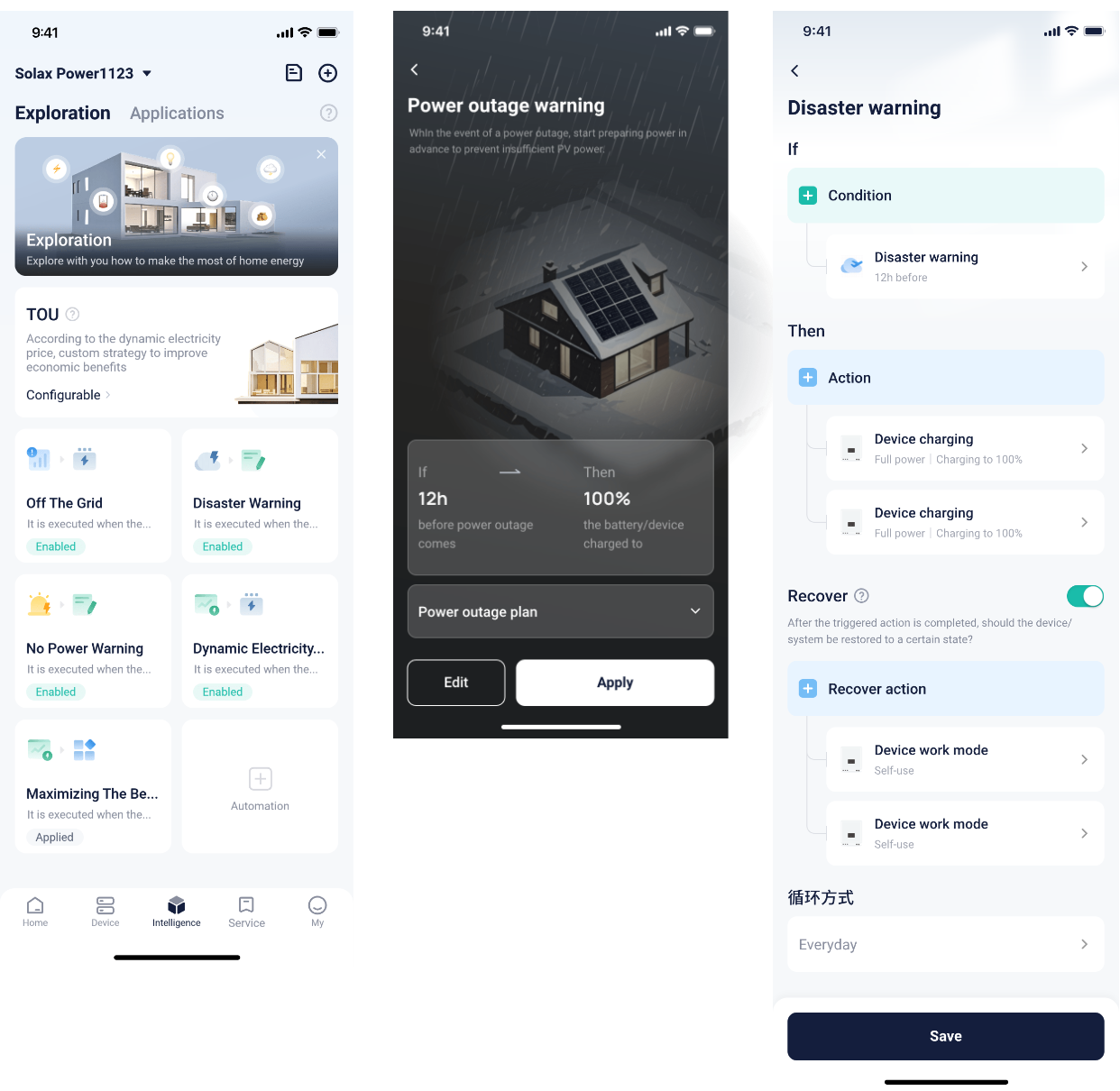
The platform intelligently pushes automation scenarios to users via the "Exploration" tab when the prerequisite conditions are met. Users who meet the conditions can view recommended cards.
Each recommended scenario has a dedicated landing page that introduces its functional value. Users can directly apply the scenario with one click or view and edit the specific parameters of the recommended scenario.
*Editing of parameters for recommended scenarios is limited — users can only modify parameters within specified ranges. For example, if the scenario recommends charging a device to 100%, the user can only adjust the setting, such as changing it to 80%, but cannot change the action itself, like switching the device to a different operating mode.
The tariff tracking function can be achieved through two automation scenarios: feed-in during high-tariff periods and purchase during low-tariff periods.
Recommended solution:
l Identify two hours during the day with relatively high electricity prices and sell power at full capacity during those periods.
l Identify two hours during the day with relatively low electricity prices and store energy at full capacity during those periods.
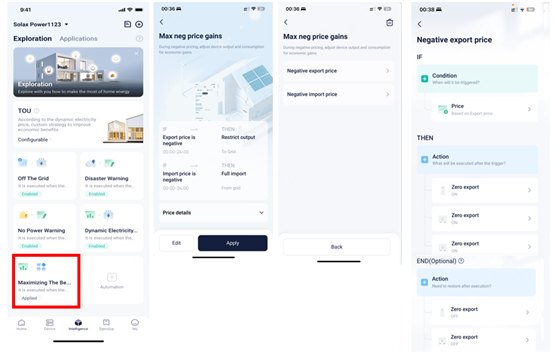
The max negative price gain function is achieved through two automation scenarios: restrict output at negative tariffs and import at negative tariffs.
Recommended solution:
l Restrict output at negative tariffs: When the export tariff is negative, all inverters at the site perform zero injection control to the grid.
l Import at negative tariffs: When the purchase tariff is negative, the loads consume power at full capacity, EV chargers operate at maximum charging current, inverter generation is limited, and energy storage is maximized.
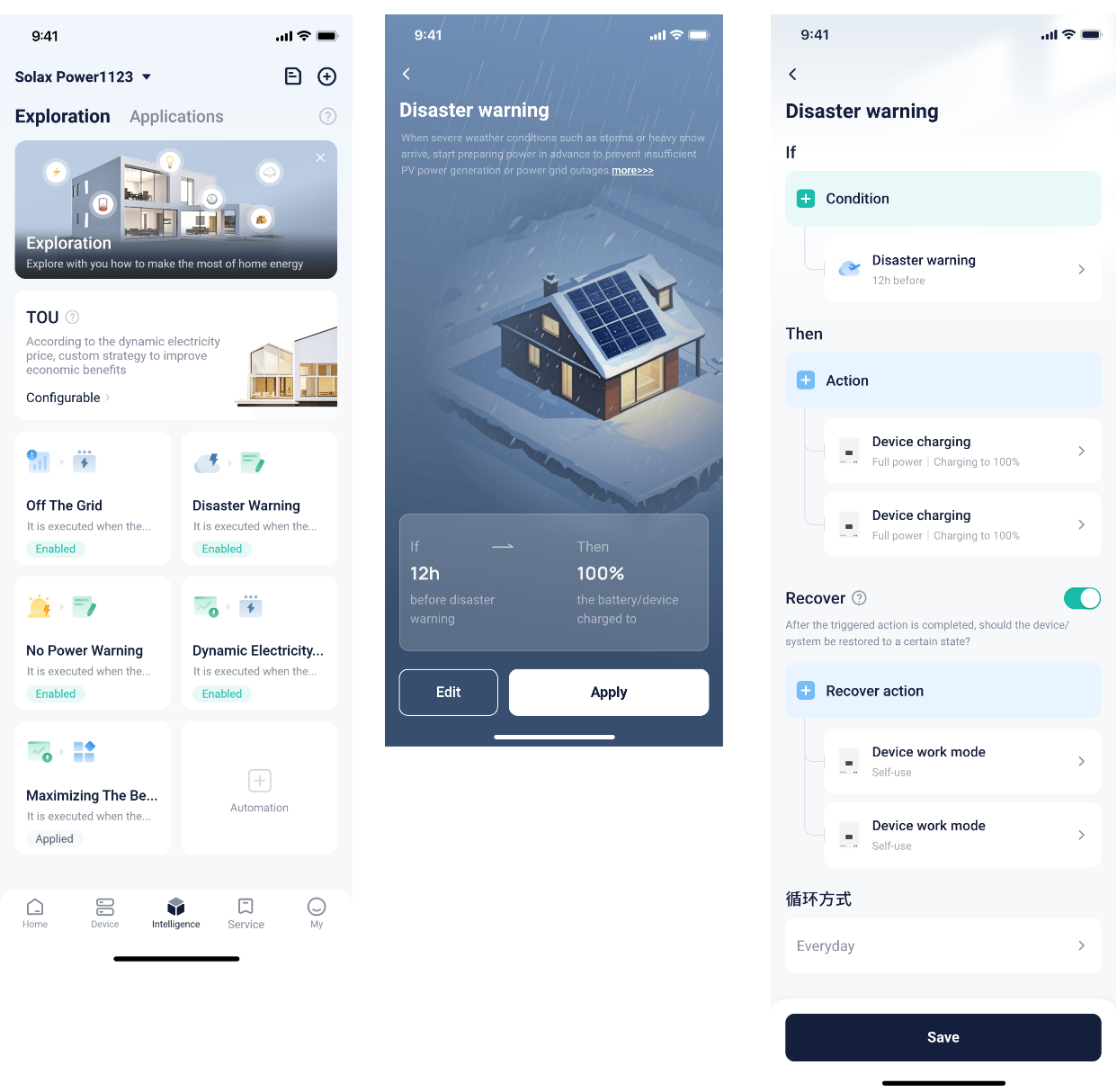
The disaster warning function is implemented through a single automation scenario, with region-specific configurations for North America and Japan.
Recommended solution:
l North America: Initiate full-capacity energy storage 12 hours before the disaster.
l Japan: Initiate full-capacity energy storage 1 hour before the disaster.
A single automation scenario is used to fulfill this function. However, due to current API limitations, it is only supported in South Africa.
Recommended solution:
l Initiate full-capacity energy storage 6 hours before a power outage.
The function of automation scenarios is currently only supported on the following models.
|
On-grid Inverter |
Hybrid Inverter |
|
X1-Mini G4 |
X1-Hybrid G4 |
|
X1-Boost G4 |
X1-IES |
|
|
X3-Hybrid G4 Pro |
|
|
X3-Hybrid G4 |
|
|
X3-Fit G4 |
|
|
X3-Ultra |


 Chuck Lee