1.The effectiveness of settings in a single - inverter scenario.
In a single - inverter scenario, when modifying the settings for Smart Load, if it is used as a load or generator, the inverter must be shut down first to ensure that the settings are properly saved. After shutting down, restart the inverter to make the new settings take effect.
Settings for other functions can be made while the device is running.
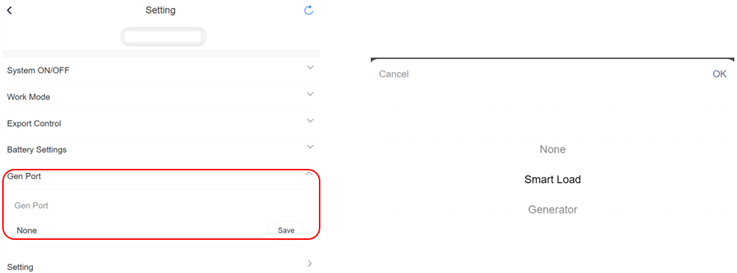
1.1 How to set Smart Load
The generator port has three options:
1. None: No device is connected to the generator port;
2. Load: The generator port is connected to a load;
l Smart Load Battery Off Voltage: When the voltage is below the minimum
value, the battery will no longer supply power to the smart load;
l Smart Load Battery On Voltage: When the voltage returns to normal, the
battery will supply power to the smart load again.
3. Generator: The generator port is connected to the generator.
2. The effectiveness of settings in a parallel scenario.
In parallel solution, some settings can take effect while the system is running, while others need to be configured in the shutdown state and will only take effect after a restart. The details are as follows:
1. Settings that take effect during operation:
2. Settings that require a shutdown to take effect:
Other settings, apart from the above three, must be configured while the system is off and will only take effect after a restart.
3. Synchronization issue in parallel settings:
After the master completes the settings, the slaves will not automatically synchronize the master's settings and needs to be reconfigured separately.
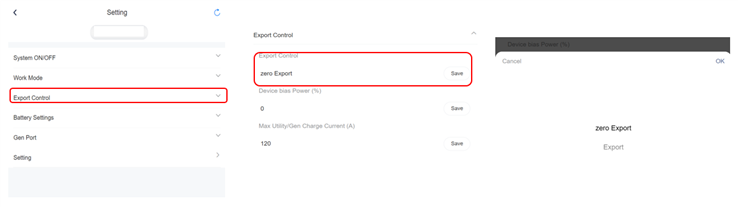
2.1 How to set Grid Export
Here users can choose between feeding excess PV power into the grid or limiting it.
Selecting "No Export" disallows feeding power into the grid, while selecting "Export" allows for it and enables users to set the percentage of power to be fed in as needed. Setting "Max utility charge current" means setting the current that can be taken from the power grid when the battery is charged.
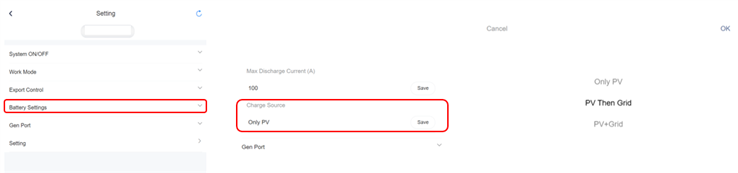
2.2 How to set Charge Source
For charging the battery, there are options to choose from: "PV Only" allows only PV charging. "PV Then Utility" prioritizes PV charging and supplements with grid charging when needed. " PV+Utility " allows for both PV and grid charging.
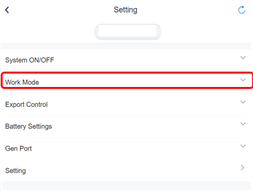
For mode selection, there are 3 or 4 working modes to choose from depending on different safety options.


 Chuck Lee