

 Chuck Lee

EVC
Issue introduction
Link Solax Account to the Alexa App
Operation guidance
Step1: Register an Alexa account and log in to the app.
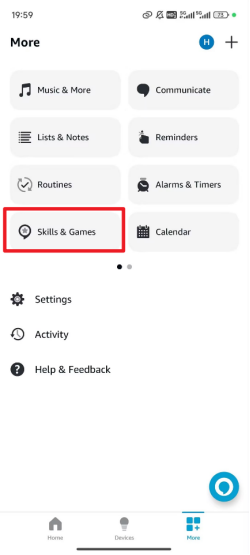
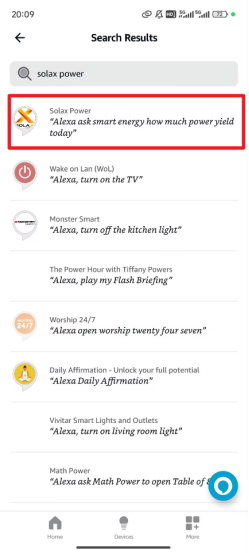
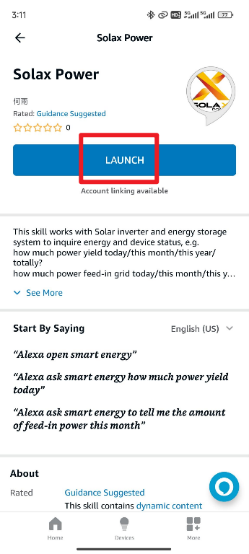
Step2: Go to the “More” menu, select “Skills & Games”, then search for and select “Solax Power” (note the space in the middle). After that, click 'Launch' to download the skill."
 |
 |
 |
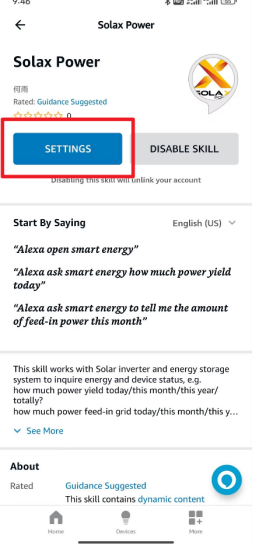
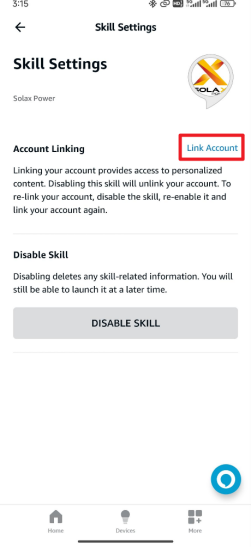
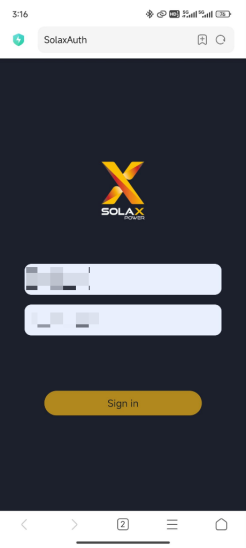
Step3: Click “SETTINGS” to enter the settings interface, then click “Link Account” to match your account. After that, Go to the Solax Global website: https://www.eu.solaxcloud.com/user-center/ and log in with your end user account.
 |
 |
 |
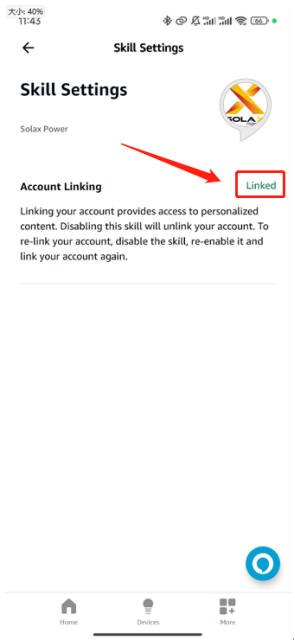
Step3: After logging in successfully, return to the Solax Power skills page and check if the account is linked. If “Linked” is displayed, the account has been successfully bound.
|
Voice Control Manual |
|
|
Start the assistant |
alexa open smart energy |
|
Check the EVC status |
my charger current status |
|
Check the EVC work mode |
my charger current mode |
|
Check the current charging amount of the EVC |
my charger about the amount of electricity charged this time |
|
Check the current charging power of the EVC |
my charger the charging power this time |
|
Switch the EVC work mode to Green |
my charger set to Green mode |
|
Switch the EVC work mode to Eco |
my charger set to economy mode |
|
Switch the EVC work mode to Stop |
my charger set to Stop mode |
|
Switch the EVC work mode to Fast |
my charger set to Fast mode |
Please note
- If the settings save fails, please check your mobile network, ensure a stable connection, log out of your account, and then log back in. Follow the steps above to make the changes.