

 Chuck Lee

BAT
Issue introduction
Balance the battery voltage when adding a new battery or replacing a battery.
Operation guidance
Step1: Enable “extend BAT FUNC” 24 hours before adding or replacing the battery, then simply add the new battery to the system.
Setting Path: Setting➡️Advanced Setting➡️Extend BAT FUNC
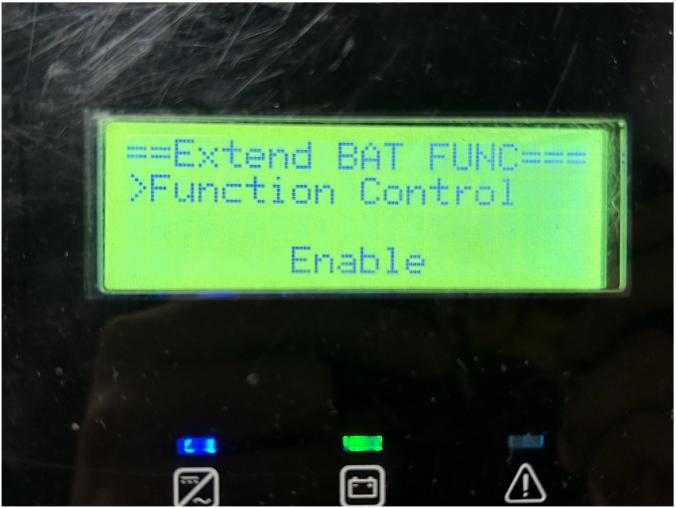
The function will automatically disable 48 hours after being enabled.
Step2: If the “extend BAT FUNC” feature is not enabled in advance, connect the original battery pack to the inverter, then check the SOC of the batteries on the inverter's screen.
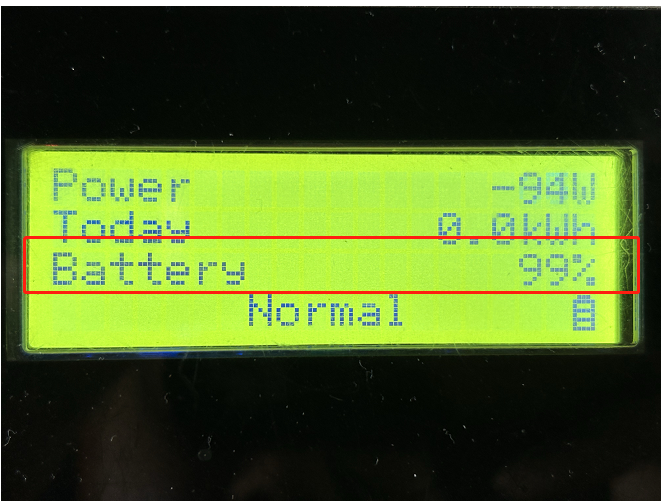
Situation1<The SOC of the original battery pack is below 55%>
Step1: Discharge the original battery pack to 10%, this step ensures that the SOC of the original battery is lower than that of the new battery.
Step2: Connect the new battery to the original battery pack and fully charge the system to ensure the new battery is fully charged.
Step3: Remove the new battery, then fully charge the original battery.
Step4: Connect all the batteries, completing the battery voltage balance.
Situation2<The SOC of the original battery pack is above 55%>
Step1: Fully charge the original battery pack, this step ensures that the SOC of the original battery is higher than that of the new battery.
Step2: Connect the new battery to the original battery pack and discharge the system to 10% to ensure the new battery is fully discharged.
Step3: Remove the new battery, then discharge the original battery to 10%
Step4: Connect all the batteries, completing the battery voltage balance.
Please note
- If the operation fails, please confirm all the steps are correct.