

 Chuck Lee

FAQ\BAT
Issue introduction
The inverter screen displays “BMS_CurSen”
Confirmation of basic information
[Photo]SN number of the inverter and battery.
Collect the historical alarm to check the occurrence count and frequency.
Guidance for installer
Step1:Upgrade the battery firmware to the latest.
Step2: Shut down the BMS
|
Take a T58 battery for example |
Take a T30 battery for example |
|
1)Power off the BMS; 2)Turn off the system by moving the circuit breaker switch to the OFF position; 3)Make sure that every indicator on the T-BAT system is off;
|
1)Press and hold 10 sec to shut down BMS; 2)Move the circuit breaker switch to the OFF position to turn off the system; 3)Make sure that every indicator on the T-BAT system is off;
|
|
For other types of batteries, turn off the BMS according to the manual. |
|
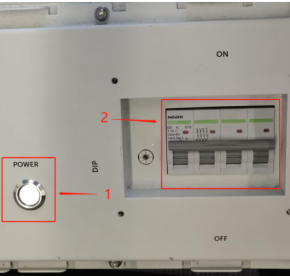
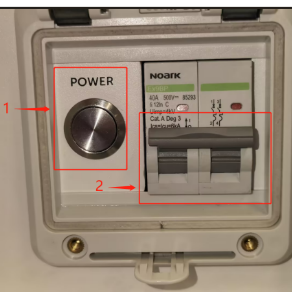
Step3: Leave the BMS connected to only one slave control and remove the connection lines of the other slave batteries.
Step4: Restarting the system: 1) Move the circuit breaker switch to “ON”; 2) Press and hold the POWER button for more than 3s to start the T-BAT system.
Step5: Wait for 15 seconds, check if there is any error message on the screen.
Step6: If no error occurs, try connecting the BMS and other batteries one by one, repeating steps 4 and 5 until the error message is found. Remove the battery causing the error and ensure the remaining batteries can function properly within the system.
Information check list
If you have completed the above <Guidance for installer>, and the problem is still not solved, please collect the following troubleshooting information and send them to the Solax technical support team.
1.[Photo]SN number of the inverter and battery.
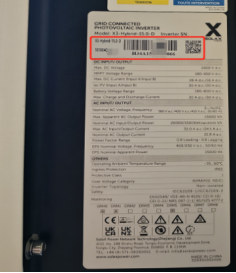 |
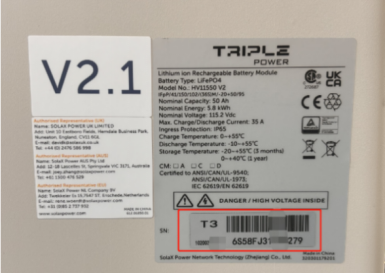 |